Skip to content
View in the app

A better way to browse. Learn more.

Atomic Avenue User Community

A full-screen app on your home screen with push notifications, badges and more.

To install this app on iOS and iPadOS
  1. Tap the Share icon in Safari
  2. Scroll the menu and tap Add to Home Screen.
  3. Tap Add in the top-right corner.
To install this app on Android
  1. Tap the 3-dot menu (⋮) in the top-right corner of the browser.
  2. Tap Add to Home screen or Install app.
  3. Confirm by tapping Install.

Just for Sellers: Fulfilling Orders with multiple items

If you have multiple quantities of an issue, some buyers may buy more than one. If you have an order with multiple quantities, Atomic Avenue will highlight the quantity on the packing list. Also, all packing lists provide the total quantity of items.

Look out for highlighted quantity numbers on the packing list, and do an item count before packing your items for shipment.
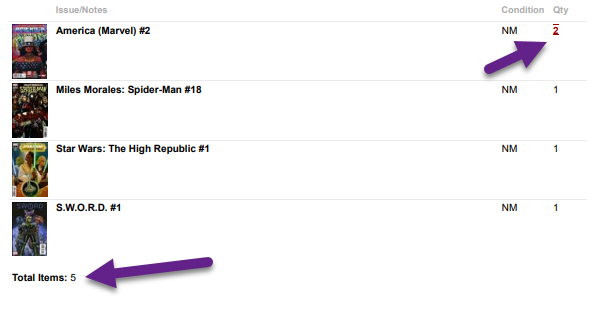
image.png.6277e5bf1c70b522d05c2a2111935c96.png


User Feedback

Recommended Comments

There are no comments to display.

Account

Navigation

Search

Search

Configure browser push notifications

Chrome (Android)
  1. Tap the lock icon next to the address bar.
  2. Tap Permissions → Notifications.
  3. Adjust your preference.
Chrome (Desktop)
  1. Click the padlock icon in the address bar.
  2. Select Site settings.
  3. Find Notifications and adjust your preference.